
CDI & Options Flow
CDI and Flow analyze options activity, through different measures.
In this chapter you learn to read 0DTE options activity with two separate panes, CDI and Flow. Both are turned on from the ACTIVITY group and appear below the chart, but they measure activity differently.
- Turn on CDI in the ACTIVITY group. In the header pick the book with the selector: SPXW or SPY 0DTE.
- The Single-leg label reminds you that CDI only counts single-leg options: spreads are excluded.
- Check the freshness dot: green under 30 seconds, yellow up to 3 minutes, red beyond.
- Turn on FLOW: the header shows book, option type, unit and how long ago the last data arrived; the session totals are on the right.
- Check availability: CDI and Flow on SPX, ES, MES and SPY.
The two panes during regular hours, on 9 October just after 12:15 ET. First CDI:
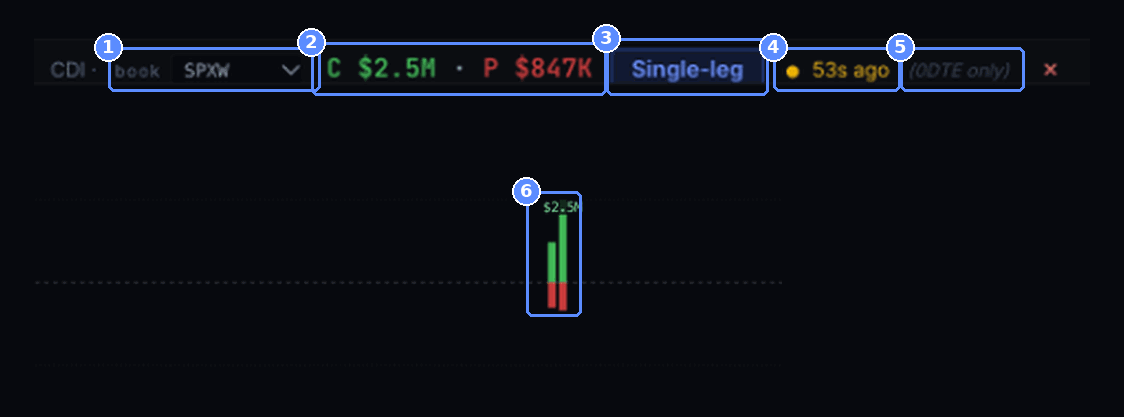
- Book. The selector shows SPXW; the alternative is SPY 0DTE.
- Totals. C $2.5M · P $847K: the single-leg 0DTE premium on calls and puts in the latest minute.
- Single-leg. Single-leg options only, spreads are excluded.
- Freshness. Yellow dot, 53s ago: the data is between 30 seconds and 3 minutes old. After 3 minutes the dot turns red and the badge gives the time of the last data, for example last update 21:00, in the time zone of the chart.
- (0DTE only). Only options expiring today.
- The bars. One per minute, green above zero for calls and red below for puts, with the total on top. The earlier bars of the session load too.
Hovering a bar opens the card for that minute:
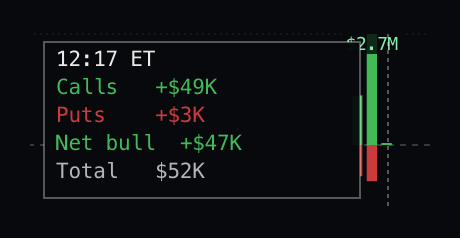
- The minute. 12:17 ET, just started.
- Calls and puts. Calls +$49K and Puts +$3K: the premium that came in during that minute.
- Balance. Net bull +$47K out of a total of $52K.
Then Flow:
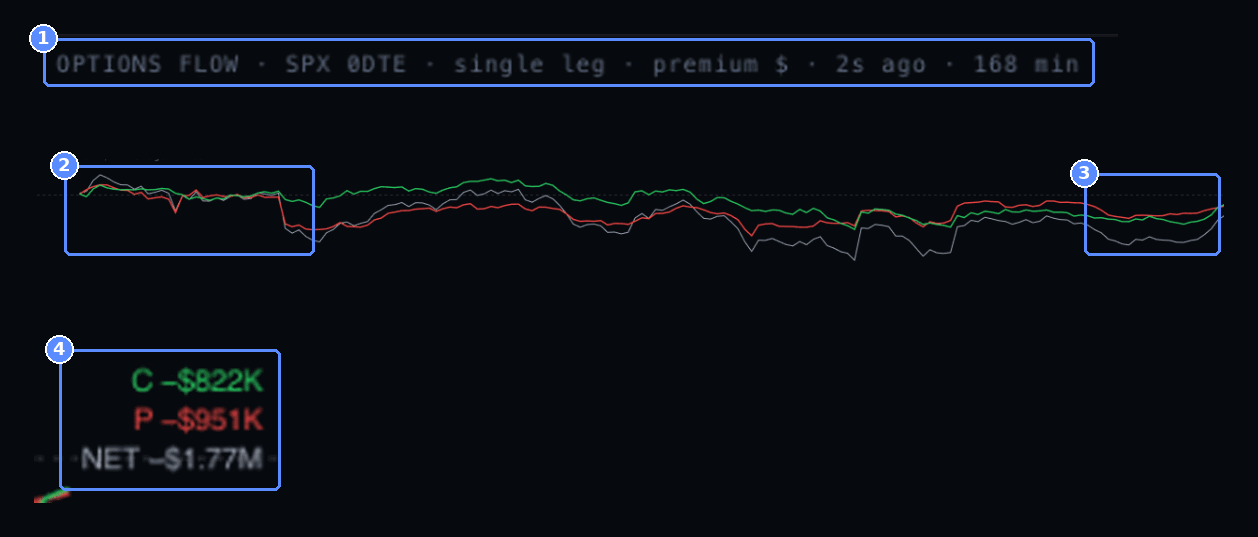
- What it measures. SPX 0DTE · single leg · premium $ · 2s ago · 168 min: dollar premium of single-leg SPX 0DTE options, last data 2 seconds earlier, 168 minutes after the open.
- The open. The three lines start from zero at 09:30. Green: calls bought at the ask minus calls sold at the bid. Red: the same for puts, plotted negative because buying puts is bearish. Gray: the two summed.
- The last stretch. As price broke above 7,851.73, the lines climbed back toward zero.
- Totals. C −$822K, P −$951K, NET −$1.77M.
How to read it. The two panes look at the same market in different ways. CDI showed more premium on calls than on puts during the minutes of the breakout. Flow, which accounts for the side of each trade, had been negative since the start of the session: calls sold more than bought and puts bought more than sold. At that moment price was rising while the 0DTE options balance stayed bearish, though recovering. It is a snapshot of options activity, not an indication of direction.
CDICumulative Delta Impact
What it is. It measures activity in options expiring today, counting only single-leg trades: spreads are excluded.
How to read it. Pick the chain in the header: SPXW for SPX, ES and MES, or SPY 0DTE. The dot shows freshness: green under 30 seconds, yellow up to 3 minutes, red beyond, where the badge gives the time of the last data, for example last update 21:00. After the close no 0DTE flow yet appears: the day’s 0DTE options have expired. If the card for a minute reads no data for this minute, the book holds nothing for it: that minute is a hole, marked by a small tick on the zero line, and not a zero. incomplete data for this minute means the book holds only part of it: it is marked the same way and shows no value.
FLOWOptions Flow
What it is. Single-leg 0DTE options premium, cumulated through the session and split by execution side. Dollars of premium, not delta.
How to read it. Green: calls bought at the ask minus calls sold at the bid. Red: puts, drawn negative when bought. Gray: the sum of the two, the net. Session totals sit on the right, for example C $462K · P −$7.03M · NET −$6.57M.
SIGN CONVENTION
A rising red line means puts sold, not puts bought.
How to use it. Watch the net line and its sign changes relative to price and levels. Check the data age in the header: if it reads in hours, it refers to the previous session.
- CDI and Flow only count single-leg 0DTE options: spreads are excluded.
- In Flow a bought put is shown as negative: read the sign before the value.
- Always check freshness: with the CDI dot red, the data is more than 3 minutes old.